www.wolframalpha.com/
Some might say that Mathematica and A New Kind of Science are ambitious projects.
But in recent years I’ve been hard at work on a still more ambitious project—called WolframAlpha.
And I’m excited to say that in just two months it’s going to be going live:
Mathematica has been a great success in very broadly handling all kinds of formal technical systems and knowledge.
But what about everything else? What about all other systematic knowledge? All the methods and models, and data, that exists?
Fifty years ago, when computers were young, people assumed that they’d quickly be able to handle all these kinds of things.
And that one would be able to ask a computer any factual question, and have it compute the answer.
But it didn’t work out that way. Computers have been able to do many remarkable and unexpected things. But not that.
I’d always thought, though, that eventually it should be possible. And a few years ago, I realized that I was finally in a position to try to do it.
I had two crucial ingredients: Mathematica and NKS. With Mathematica, I had a symbolic language to represent anything—as well as the algorithmic power to do any kind of computation. And with NKS, I had a paradigm for understanding how all sorts of complexity could arise from simple rules.
But what about all the actual knowledge that we as humans have accumulated?
A lot of it is now on the web—in billions of pages of text. And with search engines, we can very efficiently search for specific terms and phrases in that text.
But we can’t compute from that. And in effect, we can only answer questions that have been literally asked before. We can look things up, but we can’t figure anything new out.
So how can we deal with that? Well, some people have thought the way forward must be to somehow automatically understand the natural language that exists on the web. Perhaps getting the web semantically tagged to make that easier.
But armed with Mathematica and NKS I realized there’s another way: explicitly implement methods and models, as algorithms, and explicitly curate all data so that it is immediately computable.
It’s not easy to do this. Every different kind of method and model—and data—has its own special features and character. But with a mixture of Mathematica and NKS automation, and a lot of human experts, I’m happy to say that we’ve gotten a very long way.
But, OK. Let’s say we succeed in creating a system that knows a lot, and can figure a lot out. How can we interact with it?
The way humans normally communicate is through natural language. And when one’s dealing with the whole spectrum of knowledge, I think that’s the only realistic option for communicating with computers too.
Of course, getting computers to deal with natural language has turned out to be incredibly difficult. And for example we’re still very far away from having computers systematically understand large volumes of natural language text on the web.
But if one’s already made knowledge computable, one doesn’t need to do that kind of natural language understanding.
All one needs to be able to do is to take questions people ask in natural language, and represent them in a precise form that fits into the computations one can do.
Of course, even that has never been done in any generality. And it’s made more difficult by the fact that one doesn’t just want to handle a language like English: one also wants to be able to handle all the shorthand notations that people in every possible field use.
I wasn’t at all sure it was going to work. But I’m happy to say that with a mixture of many clever algorithms and heuristics, lots of linguistic discovery and linguistic curation, and what probably amount to some serious theoretical breakthroughs, we’re actually managing to make it work.
Pulling all of this together to create a true computational knowledge engine is a very difficult task.
It’s certainly the most complex project I’ve ever undertaken. Involving far more kinds of expertise—and more moving parts—than I’ve ever had to assemble before.
And—like Mathematica, or NKS—the project will never be finished.
But I’m happy to say that we’ve almost reached the point where we feel we can expose the first part of it.
It’s going to be a website: www.wolframalpha.com. With one simple input field that gives access to a huge system, with trillions of pieces of curated data and millions of lines of algorithms.
We’re all working very hard right now to get WolframAlpha ready to go live.
I think it’s going to be pretty exciting. A new paradigm for using computers and the web.
That almost gets us to what people thought computers would be able to do 50 years ago!
www.wolframalpha.com/
Regards,
Harish Thyagarajan
Systems Administrator
www.eresourceerp.com
stay ahead of your competitors

Learn.... Share.... Repeat....


Google Rolls Out Google Squared
Google releases Google Squared,
An application for structuring results data into easy-to-read tables. A number of search engines, including the much-publicized Wolfram Alpha, have already been experimenting in this space. Google finds itself adding more features to its lineup in the face of increased search competition from companies such as Microsoft, which recently released its own new search engine, Bing.
Google released Google Squared, its application for ordering search results into a spreadsheet-like "square," on June 4.
The application seems designed to join a broader move in search toward presenting structured data in response to a query, instead of the traditional page of blue hyperlinks. Indeed, other search engines have crowded into the space: Wolfram Alpha, the specialized search engine that made its debut on May 18, earned a great deal of media attention for its structuring of results into easy-to-read tables.
Google has been integrating an increasing number of tools into its core search offerings in order to better maintain its market-share lead over Yahoo and Microsoft, which launched Bing, a new search engine, on June 1.
Google had previously announced Google Squared at its annual Searchology event on May 12, along with a selection of other upcoming search products, including Google Search Options and a Google Android application called Sky Map.
Marissa Mayer, vice president of Search and User Experience for Google, introduced Google Squared at Searchology by saying that it would take "unstructured information and present it in a structured way." The subsequent demo showed that a search for "small dogs" would create a table listing information such as size and breeds. At the event, Mayer suggested that the application would roll out at the beginning of June.
The widely released version of Google Squared varies little from the original demo.
"Google Squared is an experimental search tool that collects facts from the web and presents them in an organized collection, similar to a spreadsheet," Alex Komoroske, associate product manager for Google Squared, said in a June 3 corporate blog posting accompanying the release. "If you search for [roller coasters], Google Squared builds a square with rows for each of several specific roller coasters and columns for corresponding facts, such as image, height and maximum speed."
However, the user might need to engage in a little back-and-forth to nail the result they’re looking for.
"This technology is by no means perfect," Komoroske cautioned. "That’s why we designed Google Squared to be conversational, enabling you to respond to the initial result and get a better answer."
To that end, Google Squared also allows rows and columns to be added or removed, and then responds dynamically to those changes by suggesting additional rows and columns to add that will potentially refine a search.
Released under the umbrella of Google Labs, Google Squared can be found here.
Google maintains its lead in the search-engine arena with 64.2 percent of the U.S. core search-engine market in April 2009, according to a ComScore report, while Yahoo held second place at 20.4 percent, and Microsoft came in third with 8.2 percent.
http://www.google.com/squared

An application for structuring results data into easy-to-read tables. A number of search engines, including the much-publicized Wolfram Alpha, have already been experimenting in this space. Google finds itself adding more features to its lineup in the face of increased search competition from companies such as Microsoft, which recently released its own new search engine, Bing.
Google released Google Squared, its application for ordering search results into a spreadsheet-like "square," on June 4.
The application seems designed to join a broader move in search toward presenting structured data in response to a query, instead of the traditional page of blue hyperlinks. Indeed, other search engines have crowded into the space: Wolfram Alpha, the specialized search engine that made its debut on May 18, earned a great deal of media attention for its structuring of results into easy-to-read tables.
Google has been integrating an increasing number of tools into its core search offerings in order to better maintain its market-share lead over Yahoo and Microsoft, which launched Bing, a new search engine, on June 1.
Google had previously announced Google Squared at its annual Searchology event on May 12, along with a selection of other upcoming search products, including Google Search Options and a Google Android application called Sky Map.
Marissa Mayer, vice president of Search and User Experience for Google, introduced Google Squared at Searchology by saying that it would take "unstructured information and present it in a structured way." The subsequent demo showed that a search for "small dogs" would create a table listing information such as size and breeds. At the event, Mayer suggested that the application would roll out at the beginning of June.
The widely released version of Google Squared varies little from the original demo.
"Google Squared is an experimental search tool that collects facts from the web and presents them in an organized collection, similar to a spreadsheet," Alex Komoroske, associate product manager for Google Squared, said in a June 3 corporate blog posting accompanying the release. "If you search for [roller coasters], Google Squared builds a square with rows for each of several specific roller coasters and columns for corresponding facts, such as image, height and maximum speed."
However, the user might need to engage in a little back-and-forth to nail the result they’re looking for.
"This technology is by no means perfect," Komoroske cautioned. "That’s why we designed Google Squared to be conversational, enabling you to respond to the initial result and get a better answer."
To that end, Google Squared also allows rows and columns to be added or removed, and then responds dynamically to those changes by suggesting additional rows and columns to add that will potentially refine a search.
Released under the umbrella of Google Labs, Google Squared can be found here.
Google maintains its lead in the search-engine arena with 64.2 percent of the U.S. core search-engine market in April 2009, according to a ComScore report, while Yahoo held second place at 20.4 percent, and Microsoft came in third with 8.2 percent.
http://www.google.com/squared
BING IS HERE --->
--- THE LOOK ---^
 So, Bing, earlier known as the Kumo is finally here. Announced at the recently concluded D: All Things Digital conference, the Bing is Microsoft's
first dedicated attempt to challenge Google's domination in the search arena. And prima facie, it seems to be a very good attempt indeed if we are to go by the worldwide reviews received soon after launch. Bing is all set to replace Windows Live Search and will be fully operational, starting Wednesday - although it's available in most countries now.
Soo what is bing ???
It's now time for us to take a first look at Bing. Does it really have what it takes? Will it ever replace that Google homepage of yours? Before we delve further into this, let's just try to shake off our prejudice (is that the right term?) most people have for anything that originates from Redmond. That, coupled with the unshakable faith in Google, makes for a nice combination, which usually ends up in most of us writing off any competition (to Google) even before actually trying them out. Remember Cuil? Anyone? So, has Bing managed to catch Google with its pants down? Or is it a product you can pass? Read on.

--- THE LOOK ---^
First off, what strikes you is the look of the Bing homepage. It's loaded with nice wallpapers that seem to change on a daily basis. On a closer look, you notice that you can find the story behind the wallpaper by hovering your mouse over various "locations" on the image. The interface is quite basic and intuitive - as good as Google.
The only complaint here is the image that some people might deem is an unnecessary addition. For others, this might be a welcome change from the white, too minimalist, simple Google page.--- Searching ----
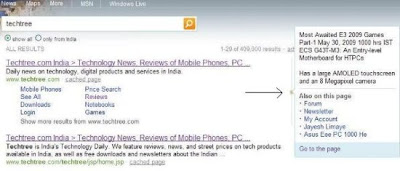
The most important function of any search engine is the way it displays search results and Bing does it pretty well. The good thing about Bing is the way it throws the information at you in a much uncluttered, unconfused manner. The keywords you feed in are further used to "suggest" you more results. There is a related searches bar on the sides, similar to Google. As for the results, it does come up with what you are actually looking for most of the times. However, this one actually needs some time for you to "settle" in. Maybe a month down the line, we can comment if Bing can really replace Google, or even Yahoo for that matter, which if you're not aware, is in second position in the search engine segment. What we liked about the web results are the "snippets" of information that you see beside every search result link. To get an idea of what I am talking about, take a look at the image below. Once you search for a term and get a page with the search results, all you need to do is to hover your mouse over the thin line on the side of the list, and it will display what else is there on that page. Although I am not very fond of these mouse hover initiated things, this one does it in a very unobtrusive way. Nice!
---- Bing Tips & Tricks ----
1. Use the full version of Bing
If you are using Bing outside North America, chances are that you seeing a localized version of Bing that may be missing some features. For instance, the Indian version of Bing.com doesn’t have search history and the image on the Bing home page here is not interactive as in the US version.
To explore the full version of Bing, go to this page and set English - US as your default region. You can now enjoy all the Bing features from anywhere.
2. Track Companies from the IE Favorites Bar
If you search for a company stock (e.g. GOOG or MSFT), Bing will automatically create a web slice for that company which you may then add to IE 8 and track the performance directly from the favorites bar. You need Internet Explorer 8 to try this feature.
3. Watch Preview of Hulu Videos outside US
Hulu hosts some popular popular TV shows but the problem is that you can only watch these videos if your computer has US based IP address.
However, Bing lets you watch shot previews of Hulu video even outside US. Just search for any TV show episode on Bing Videos (see example) and hover the mouse over any of the video thumbnail to watch a short clip.
4. Save and Email search results
With Bing, you can save your search history on to a local folder inside Bing or to your Windows Skydrive account. Alternatively, you may send your search queries to a friend via email or publish them on your Facebook wall via Bing. You’ll need Silverlight to share queries in Bing.
5. RSS Feeds of Search Results
Unlike Google or Yahoo, Bing offers RSS feeds for their web search results that you can subscribe to inside any feed reader. Your browser should be able to auto-detect the RSS feed of Bing pages or you can append &format=rss to any Bing search URL and convert it into a feed.
This RSS feature is not available for Image or Video search in Bing.
6. Find Pages That Link to MP3 Files or Documents
Bing (and Live Search) supports a unique "contains" search operator that lets you find web pages that contain links to particular file types.
For instance, a search like susan boyle contains:mp3 will show pages that are about the British singer and that also link to MP3 files. Replace mp3 with doc to search pages that contain links to Word Documents.
fOR ANY MORE QUIRES pLEASE POST COMMECNTS,I loVE COMMENTS . .. . .........
Subscribe to:
Posts (Atom)