CloudMagic Adds Instant Online,Offline Gmail and Google Docs search

We have been pretty big fans of CloudMagic for some time now. Not only does it allow you to search Gmail, Google Docs and Contacts offline but it is also SuperFast at it.Also supports Google Calendar.The free browser extension that brings super-speedy search to Gmail and Google Apps E-mail, is back in a new and improved version. It still delivers lightning-fast searches of your e-mail account, but now also searches your Google Docs and Contacts, too.
CloudMagic Search
Once installed, CloudMagic appears as a small search bar on the upper right hand side of your 
Gmail or Google Docs window or on the Browser. You do need to manually add your Google 
accounts (it can support multiple accounts as well) by supplying your user name and password. 


CloudMagic stores your password locally on your own PC, not on its servers and that's the best part.

CloudMagic automatically begins indexing the contents of your e-mail account. The process is a bit time-consuming--it takes some time--It begin's searching right away, while CloudMagic is indexing. And you'll see results right away, too.
Search results appear in real-time, and you can search your Gmail account from within your Google Docs account, or vice-versa. CloudMagic now sports a tabbed interface that lets you see which results it has returned from "Mails," "Docs," or "Contacts." It makes it very easy to find what you're looking for, no matter which app you happen to be using.
CloudMagic results appear in a panel that drops down from beneath the CloudMagic bar. You can see a brief preview of the content that it has found. An e-mail result, for example, displays the sender, subject line, and a brief preview of an e-mail message, while a Google Docs result displays the name of the file, its format, and information about who shared it. Clicking on the result brings up another panel with its full contents, which appears to the left of the CloudMagic results list.CloudMagic is kind of Instant search for your Google Apps
From within the preview of the message, you can choose to open the document or email in question, or you can click on the name of an attached file in an email to open it.
I tried this personally and it appears to work perfectly for Gmail/Google Apps account, even if there is no Internet connection available.

With this addition, CloudMagic has got all the major Google services covered, including Gmail, Google Docs (Spreadsheets, Presentations, Form, Documents), Contacts and now Google Calendar.
Supported for Operating system :- Mac,Windows as well as for Linux.
Supported for Browser:- FireFox,Chrome
Download Link for CloudMagic is HERE

+1 button For Google Search

Use the +1 button to publicly show what you like, agree with, or recommend on the web. The +1 button can appear in a variety of places, both on Google and on sites across the web. For example, you might see a +1 button for a Google search result, Google ad, or next to an article you're reading on your favorite news site. Your +1’s and your social connections also help improve the content you see in Google SearchLearn how to +1. Don't have the +1 button yet? Get it now.


+1's from Google is actually a amazing product.When you +1 something, the +1 button will turn blue and the +1 will be added to the +1's tab new window of your profile. Here you can manage all your +1’s and decide whether you want to publicly display the +1’s tab.
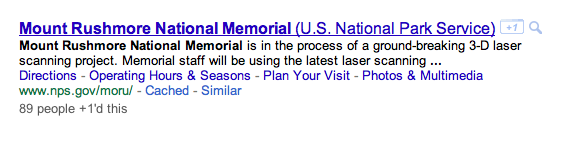
Regardless of whether you chose to publicly share your +1’s tab, your +1’s will still be visible to others viewing the content you +1’d. For instance, your +1 could appear as part of an anonymous aggregated count of the people who have also +1’d the same thing:
Your name could also appear next to the +1 to help your friends and contacts identify which content may be most useful to them:


When you want the +1 button 


We know! Right now we’re only showing the +1 button to a small slice of our signed in US users as an experiment. We want to make sure everything is working well before we roll the button out to everyone. The people who have the +1 button now were chosen at random.
If you don’t have the +1's from Google, but want to try it out, you can enroll in our +1's from Google experiment. Before you sign up, make sure you:
  • Use a supported browser.
  • Access www.google.com in English from the US.
  • Have the most recent Google navigation bar with the gear icon in the top corner of the page.
  • Sign in/sign out of your Google Account  to refresh your cookies.
  • Are signed in to your Google Account, and remain so while you want to see the +1 button experiment.

If you meet these requirements, enroll in the +1 button experiment on the Google Experimental page . Once you enter the +1 button experiment, a +1’s tab will be added to your Google profile where you can manage your +1’s. If you want to un-enroll from the experiment, just click Leave on the Google Experimental page. This will remove the +1’s tab from your profile.
If you’ve enrolled in the experiment, and you don’t see the +1's from Google, or if you lose access to the +1's from Google, don’t worry. We’re constantly making modifications which may temporarily affect its availability.


For More Information:- Click Here

"PaperPhone:Future Cellphone" future for smartphones and tablets

Tired of cracking the glass on your smartphone screen? Or carrying around the extra weight in your pocket? And how many times have you wanted to smash your phone when talking to annoying people?Say thanks to the latest technology you'll soon be able to crush that handset mercilessly. Well, almost.

PHOTO: The next phase of smartphones could be as thin and light as a piece of paper.
The e-paper prototype PaperPhone has a 3.75-inch thin-film display and developers call it the world's first flexible smartphone. It can do everything a smartphone can, such as make calls, display books, and play music.The world’s first interactive paper computer is set to revolutionize the world of interactive computing. future cellphone will be as thin, light and flexible as a sheet of paper.

At a computing conference next week, Roel Vertegaal, associate professor of computer science and director of the Human Media Lab at Queen's University in Ontario, Canada, will officially unveil the "PaperPhone."

As seen in the vid below, the prototype is based on e-ink technology and is more like a bendable plastic sheet about the thickness of a conference badge. It can be operated by bending the corners to turn a page, squeezing to make a call, and even written on with a pen.

“this is the future. everything is going to look and feel like this within five years,” says creator roel vertegaal, the director of queen’s university human media lab,. “this computer looks, feels and operates like a small sheet of interactive paper. you interact with it by bending it into a cell phone, flipping the corner to turn pages, or writing on it with a pen.”
being able to store and interact with documents on larger versions of these light, flexible computers means offices will no longer require paper or printers.
“the paperless office is here. everything can be stored digitally and you can place these computers on top of each other just like a stack of paper, or throw them around the desk” says dr. vertegaal.
"This is not a maybe. This is a definite," Also said Vertegaal. "This is what your phone will look like."
the invention heralds a new generation of computers that are super lightweight, thin-film and flexible. they use no power when nobody is interacting with them. when users are reading, they don’t feel like they’re holding a sheet of glass or metal.
dr. vertegaal will unveil his paper computer on may 10 at 2 pm at the association of computing machinery’s chi 2011 (computer human interaction) conference in vancouver — the premier international conference of human-computer interaction. an article on a study of interactive use of bending with flexible thinfilm computers is to be published at this conference, where the group is also demonstrating a thinfilm wristband computer called snaplet.
Lets wait and watch the next paperPhone...